The Second Line Is Not a Spare: Testing Internet Failover Before You Need It
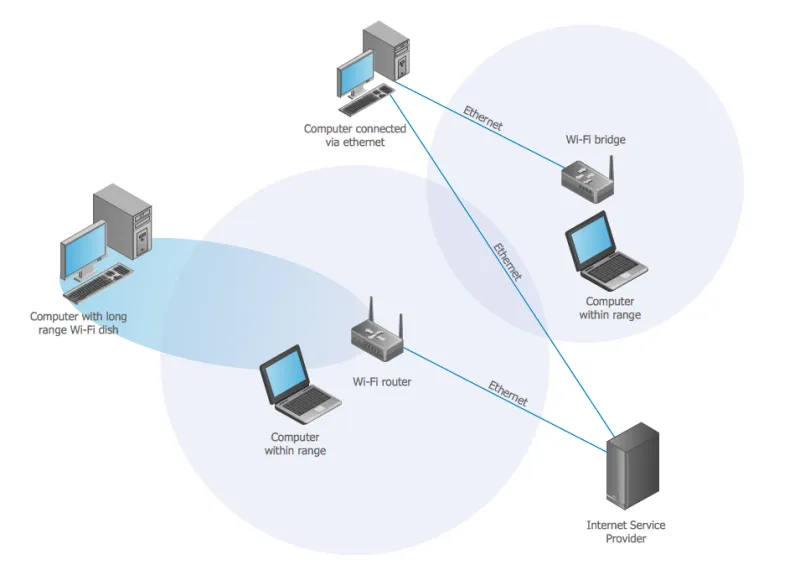
Photo: network cabinet dual WAN routers ethernet cabling business office, via www.conceptdraw.com
In a cloud-first office the internet connection has stopped being a utility and become the floor. Every application above it — email, telephony, accounting, the CRM, the door access system — depends on a path to the outside world that most organisations have never actually watched fail.
That is the awkward truth behind most redundancy claims. A second line appears on the invoice, an engineer fits a router, and the project is declared complete. Nobody pulls the cable at ten o'clock on a Tuesday to find out what happens next. This guide is about closing that gap.
Redundancy, resilience and the space between
Redundancy is a component you can buy. Resilience is a property you have to prove. Two circuits from two providers may still share a duct, a chamber, a power feed, a patch panel and a single firewall — and any one of those will take both of them down together.
The useful question is not "do we have a backup line?" but "what exactly survives if the primary path fails, and who has tested that claim?"
Start with the physical route
Ask each provider, in writing, for the physical path of the service: which exchange or head-end it comes from, which ducts it uses, and where it enters the building. Fibre from an Openreach-based wholesale product and fibre from an alternative network operator may look like two suppliers on paper and run through the same trench in the street.
Then look inside. The building entry point, the comms room switch, the UPS, the firewall and even the cabinet are all single points that no amount of carrier diversity will fix. If both circuits terminate on the same switch, your redundancy lasts precisely as long as that switch.
Watch for two providers, one network
Resellers are not networks. A retailer selling you "our business fibre" may be buying the same wholesale product from the same infrastructure as your existing supplier. Ask who owns the access network and the backhaul, not who sends the bill. Where a leased line is in place, check whether the secondary service is delivered from the same exchange — in which case local flooding, power loss or cable damage removes both at once.
The router is where failover lives or dies
Most dual-WAN routers will fail over. Far fewer will do it cleanly, quickly and consistently.
- Health checking. Ask what the router monitors to decide the primary line is down — a ping to a public address, a DNS query, an interface state — and what happens when that target is unreachable but the line is fine. A poorly chosen probe can trigger a false failover storm.
- Session state. Established connections generally do not survive the switch. Long uploads, remote desktop sessions and file transfers will usually need restarting; users should know that in advance.
- Public addressing. Confirm whether the secondary circuit carries a static public IP. Without one, inbound services — VPN, remote desktop gateways, CCTV viewing, mail relays — disappear the moment failover occurs.
- Failback. Does the router return to the primary line automatically, and does it flap between the two when the primary is marginal? Set a delay and test it.
- Quality of service. Voice and video need priority treatment on the backup just as on the primary. A line that can carry a hundred browser tabs may still produce unusable calls.
Where several sites are involved, an SD-WAN overlay can make policy consistent across them, but the underlying physical questions remain the same.
DNS is where failover goes wrong quietly
Name resolution is the least glamorous dependency and the most common cause of a failover that "worked but nobody could do anything".
If your firewall or a server in the office acts as the DNS forwarder for staff devices, that service sits behind the failed line. Internal names — intranet, file shares, printers, line-of-business applications — may be resolved by on-premises records that are unreachable, and browsers using encrypted DNS of their own may bypass your filtering entirely once the primary path drops. Cache behaviour matters too: short time-to-live values help public records follow the failover quickly, while long ones can leave clients pointing at an address that no longer exists.
Write down which resolver each device class uses, and test resolution from a device on the backup path rather than from the router itself.
5G failover: excellent, with conditions
A 5G router is now the most common second path for UK SMEs, and for many offices it is a sensible one. It is also the option most often misunderstood.
Mobile networks typically place subscribers behind carrier-grade NAT, which means no inbound connections and no usable static address unless the provider sells one as a specific add-on. Latency and jitter vary with load, so voice over 5G can be acceptable at 08:00 and poor at 12:30. Data allowances and fair-use terms may be modest for a business connection, and a firmware update or a large backup can consume the month's headroom in an afternoon.
Then there is signal. The comms room is frequently in a basement, next to a lift shaft and a bank of steel conduit. Check the actual signal strength at the router's resting place, and budget for an external antenna if it is marginal. Test during working hours, when the local mast is busiest.
VPNs and remote access
The remote access service is the component most likely to be forgotten, because it usually lives at head office behind the line that has just failed. If the VPN concentrator or remote desktop gateway is reachable only via the primary public address, a site outage becomes a company-wide outage for anyone working from home.
Options include hosting the gateway in a cloud environment rather than on-premises, using a provider-independent addressing scheme, or maintaining a tested dynamic DNS arrangement — but whichever you choose, verify it by connecting from outside while the primary line is genuinely down.
Voice: the item everyone forgets
Hosted telephony survives a site outage only if three things hold. The handsets must be able to reach the internet over the surviving path. The SIP provider must accept registration or traffic from the new public address, which matters where authentication is by IP address rather than credentials. And incoming calls must route somewhere sensible — a divert to mobiles, or a hunt group that excludes the unreachable site.
Emergency calling deserves a specific check. Staff need to know how to reach the emergency services if the desk phone is silent, and where the registered location is for any softphone in use.
How to test it honestly
Book a window during working hours, tell a small number of people, and pull the cable at the router — not at the wall socket, and not by disabling the interface in software. Time how long until service resumes. Then work through the real dependencies: a Teams call, an outbound email with an attachment, the card terminal, the label printer, the door access system, the alarm signalling and one remote worker connecting in from home.
Record three things: how long failover took, what did not survive, and whether anyone outside IT noticed. That third answer is the most informative of the three. Test again six months later, and always after a firmware update or a change of provider.
A plain-English checklist
- Physical routes confirmed in writing for both circuits, with no shared duct or entry point you can identify.
- Secondary circuit carries a static public IP, or every inbound service has a documented alternative.
- Router health checks, failback delay and quality-of-service settings agreed and recorded.
- DNS resolvers, forwarding and internal name resolution verified from a device on the backup path.
- 5G signal measured in situ at busy times, with data allowance and inbound limitations understood.
- Remote access gateway reachable independently of the office connection.
- Voice registration, call divert and emergency calling rehearsed.
- Card payments, alarms, CCTV and door access tested on the secondary path.
- Failover time and post-test findings written down, with an owner for each fix.
Buying the right thing
When the next renewal arrives, ask suppliers for route diversity evidence, a static address on the secondary service, a service level that reflects your trading hours, and out-of-band management so that a failed circuit at a remote site can still be reached. Compensation regimes may reimburse inconvenience; they will not reimburse a lost day of trade.
The purpose of a second line is not to satisfy an auditor or a questionnaire. It is to keep working when the first one stops. Until somebody has pulled the cable and written down what happened, that remains a hope rather than a design.